






























How eCommerce Analytics for Businesses Helps Enterprises Scale Smarter and Faster


- The Four Types of eCommerce Analytics Every Enterprise Should Understand
- Data Types and Sources of eCommerce Data Enterprises Should Monitor
- Enterprise eCommerce Analytics Use Cases
- How eCommerce Analytics Improves Performance Across the Customer Lifecycle
- Essential eCommerce Analytics Metrics and KPIs Enterprises Should Track
- Building an Enterprise eCommerce Analytics Architecture
- Privacy, Compliance, and Security
- Common eCommerce Analytics Challenges and How Enterprises Overcome Them
- Enterprise Roadmap for Building eCommerce Analytics
- Emerging Trends Shaping the Future of eCommerce Analytics
- How Appinventiv Turns Commerce Analytics Into Financial Growth
- Frequently Answered Questions

Key takeaways:
- eCommerce analytics transforms fragmented commerce data into faster decisions across acquisition, retention, inventory, and revenue growth.
- Enterprises that combine predictive analytics and AI gain earlier visibility into demand shifts, churn risks, and growth opportunities.
- Customer acquisition, conversion, retention, and profitability improve when analytics connect marketing, commerce, and operational data.
- Modern eCommerce success depends on unified data architecture, governance frameworks, and real-time decision intelligence capabilities.
- High-performing enterprises treat eCommerce analytics as a strategic growth function rather than a reporting and dashboard exercise.
Every online transaction generates information, and large companies rely on eCommerce analytics for businesses to collect and act on data from websites, apps, and sales systems. Customers search for products, add items to online carts, and write reviews. The total volume is huge, but many executives struggle to turn these numbers into clear profits.
The business problem is rarely a lack of operational information. Most enterprises already own plenty of sales and marketing files.
But separate teams use separate software systems. The marketing team tracks ads on one screen, and the logistics team tracks inventory on another screen. This system division hides the buyer’s complete path.
Corporate leaders face intense pressure today. They must increase conversion rates and lower customer acquisition costs. Old reports cannot fix these modern operational issues. Leaders need data analytics in eCommerce to access real-time facts and fast predictive models to make decisions.
This need continues to grow as eCommerce analytics becomes critical; global eCommerce sales are expected to reach $6.3 trillion by the end of this year.
Modern analytics for eCommerce turns raw files into clear answers. It helps companies find buyers, manage stock, and grow revenue. You can build this capability in your business, and you should start by learning the specific types of commerce metrics.
Leading brands already use AI-powered analytics to predict demand, reduce churn, and improve conversions.
The Four Types of eCommerce Analytics Every Enterprise Should Understand
Enterprise brands do not rely on a single data capability. Leaders build multiple layers of eCommerce analytics for businesses to track performance across the enterprise. These tools monitor daily performance and support hard decisions.
They turn raw sales numbers into clear financial value. Your teams use them to improve customer acquisition, checkout conversions, and buyer retention. The data also assists with inventory planning and revenue growth.
Descriptive Analytics: Past Performance
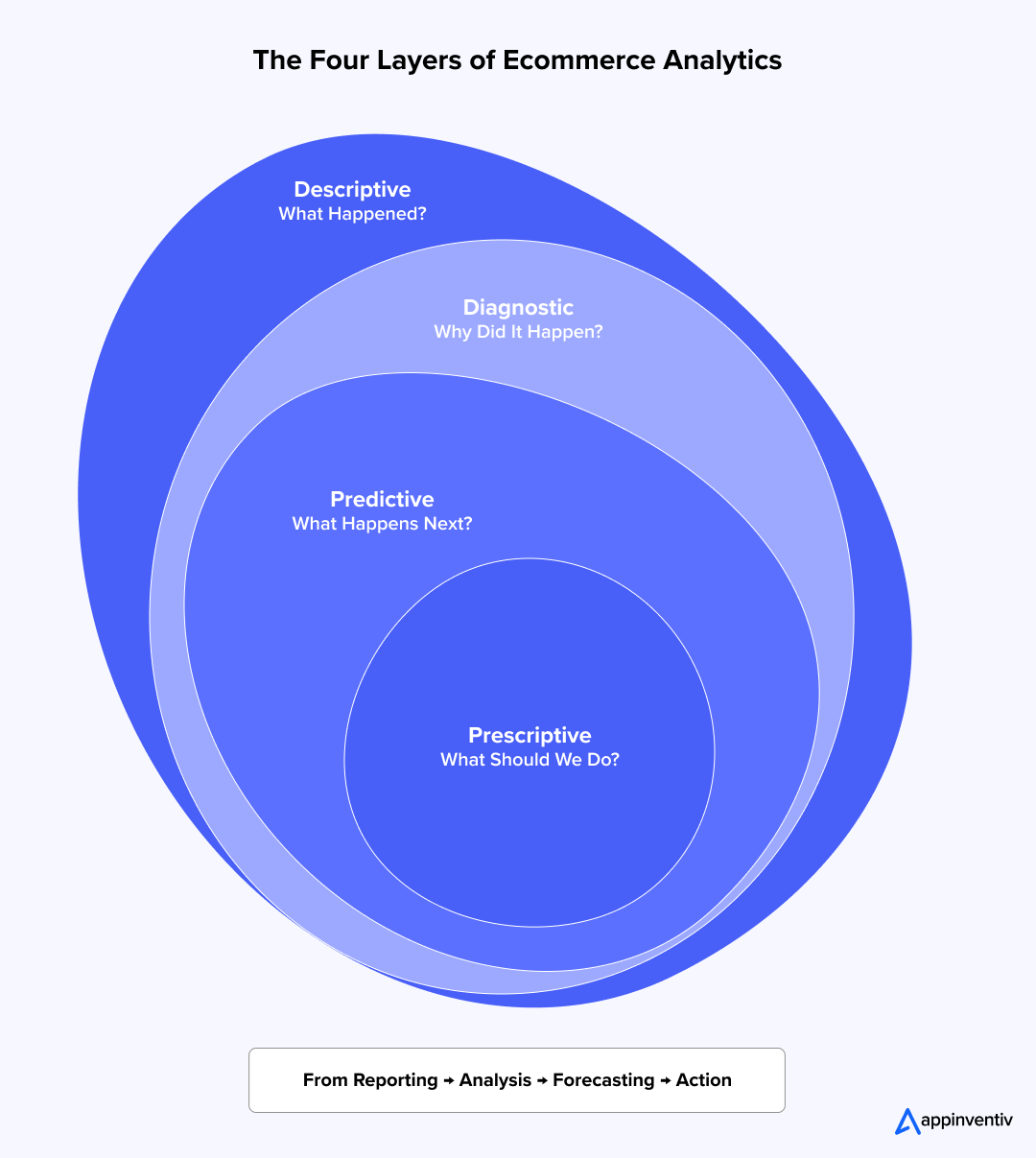
This layer of eCommerce data analytics collects data from your primary commerce software. It extracts facts from CRM systems and customer data platforms (CDPs). The process provides clear visibility into historical business metrics.
Your operations teams track conversion rates, average order value (AOV), and cart abandonment. They also pinpoint exact traffic sources. Most corporate dashboards operate at this level. Enterprise BI platforms display these facts to clarify your current revenue position.
Diagnostic Analytics: Performance Drivers
This analytics eCommerce layer explains why your sales outcomes happen. Teams investigate specific details to find the root causes of performance shifts. They map attribution paths and analyze distinct behavioral segments.
They study funnel drop-offs to find friction points. These friction points hurt customer retention and reduce revenue. This work relies on precise event tracking. Teams use cohort analysis and session data to identify specific problems.
Predictive Analytics: Future Outcomes
This eCommerce analytics method projects future trends. It applies machine learning models to your historical records. Executives use these models for demand forecasting and customer churn prediction.
The software also builds customer lifetime value (CLV) modeling. These projections help leaders allocate quarterly budgets. Teams use the facts to manage stock levels across fulfillment networks. They prepare the business for sudden market shifts.
Prescriptive Analytics: Targeted Actions
This layer recommends specific corporate actions. This eCommerce analytics software combines predictive models with business rules and generative AI engines. For example, it guides algorithmic pricing choices. It delivers personalized product recommendations to online buyers.
It also powers automated replenishment systems. Corporate leaders use these tools to build real-time decision intelligence platforms. The technology automates choices to protect your margins.
The strongest commerce programs combine all four layers. They build a continuous cycle of measurement and action.
- First, your teams measure past sales numbers.
- Second, they analyze the operational causes.
- Third, the systems project future demand.
- Fourth, leaders execute the recommended action.
This system gives executives complete visibility over the buyer journey.
Data Types and Sources of eCommerce Data Enterprises Should Monitor
Good analytics for eCommerce depend on clean, varied information. Your brand collects facts from customer touchpoints, warehouse systems, and external networks. Knowing where these numbers originate helps your teams build sharp buyer files and accurate sales projections.
| Data Type | What It Means | Where It Comes From |
|---|---|---|
| Zero-Party Data | Facts that customers share directly with you | Customer surveys, preference forms, shopping wishlists |
| First-Party Data | Information you gather from your own channels | Corporate websites, mobile apps, CRM files, sales history |
| Second-Party Data | Information you get from trusted partners | Online marketplaces, partner networks, retail alliances |
| Third-Party Data | Outside audience and market records | Commercial data brokers, industry files, market research apps |
Your own first-party data forms the base of your digital tracking. This set includes customer buying history, web choices, loyalty program habits, and support tickets.
Key data sources include:
- Web tracking programs that record buyer choices and checkout transactions.
- CRM systems that hold client contacts and direct sales records.
- Customer Data Platforms (CDPs) that blend individual buyer entries into single profiles.
- Commerce platforms that monitor store purchases, item speeds, and warehouse stock.
- Marketing software that counts ad clicks and channel performance.
- Customer service systems that save support logs and feedback scores.
Combining these channels inside a single system gives leaders a clear view of buyer choices. It also shows warehouse performance and total sales growth.
Enterprise eCommerce Analytics Use Cases
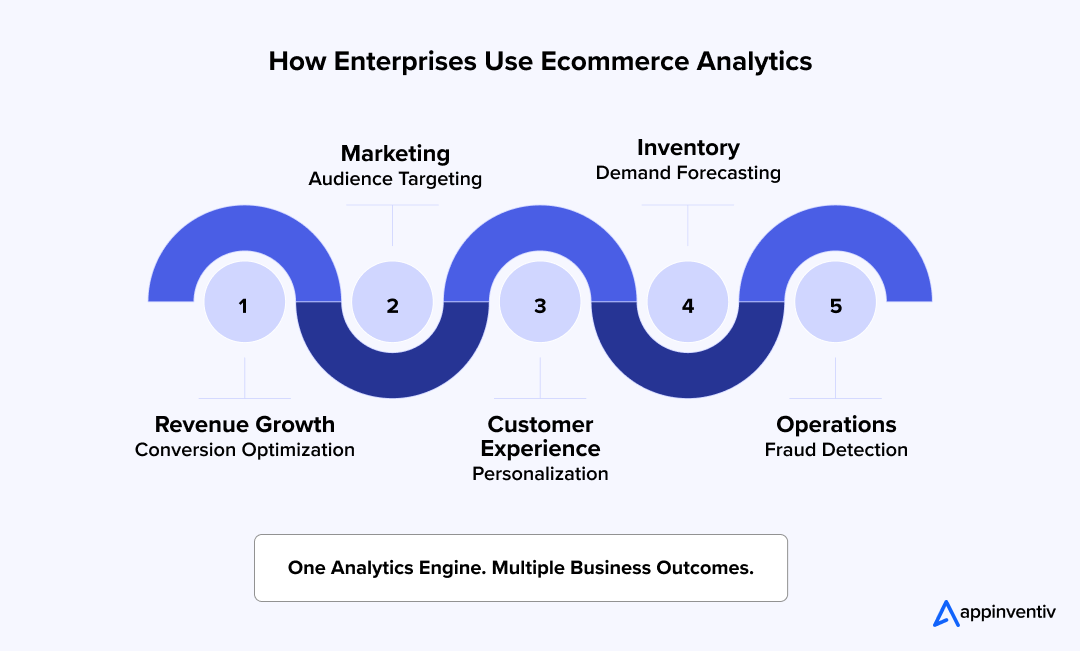
eCommerce analytics for businesses only delivers value when your teams apply it. Top brands use tracking to help buyers find products faster and grow sales. They run regular data checks to speed up corporate decisions. Combining behavioral tracking, machine tools, and central storage turns raw files into clear financial results.
Conversion Optimization and Customer Site Analysis
Brands use eCommerce analytics to find web errors that block sales. Teams analyze site drop-offs and buyer behavior to identify where shoppers abandon the checkout process. For example, Amazon constantly tracks user clicks. They adjust their search tools and payment pages based on these files. This steady work keeps their checkout completion rates high.
Personalization and Customer Segmentation
Corporate leaders group buyers into clear categories to show tailored product deals. Central data software consolidates browsing records and purchase histories into a single file. Netflix and Amazon are perfect eCommerce analytics examples as they use these groups to power their suggestion features. The software displays matching products to spark quick sales.
Inventory Management and Sales Forecasting
Stock choices affect net profits directly. Predictive analytics eCommerce tools analyze seasonal trends to forecast future store needs. Retailers like Walmart deploy predictive software to project buyer demand. This tracking reduces empty shelves and avoids expensive storage costs.
Audience Targeting and Marketing Performance
Tracking helps marketing managers pick the best target groups. It reveals exactly which ad networks bring the highest profits. Tracking models connect your marketing spend directly to store sales.
Fraud Detection and Basket Analysis
Digital stores use data to catch scammers and study buyer carts. Fraud management eCommerce software flags bad transactions before your business loses money. Cart analysis shows which items people buy together. This knowledge helps managers plan product pairs and storefront displays.
These use cases & examples of analytics for the eCommerce industry show how data drives growth across marketing, warehousing, and executive suites.
How eCommerce Analytics Improves Performance Across the Customer Lifecycle
Customer paths are not straight lines. A shopper finds a product on social media networks. They read reviews on a mobile phone. They buy the item later on a desktop computer. Weeks after that, they contact your customer support center.
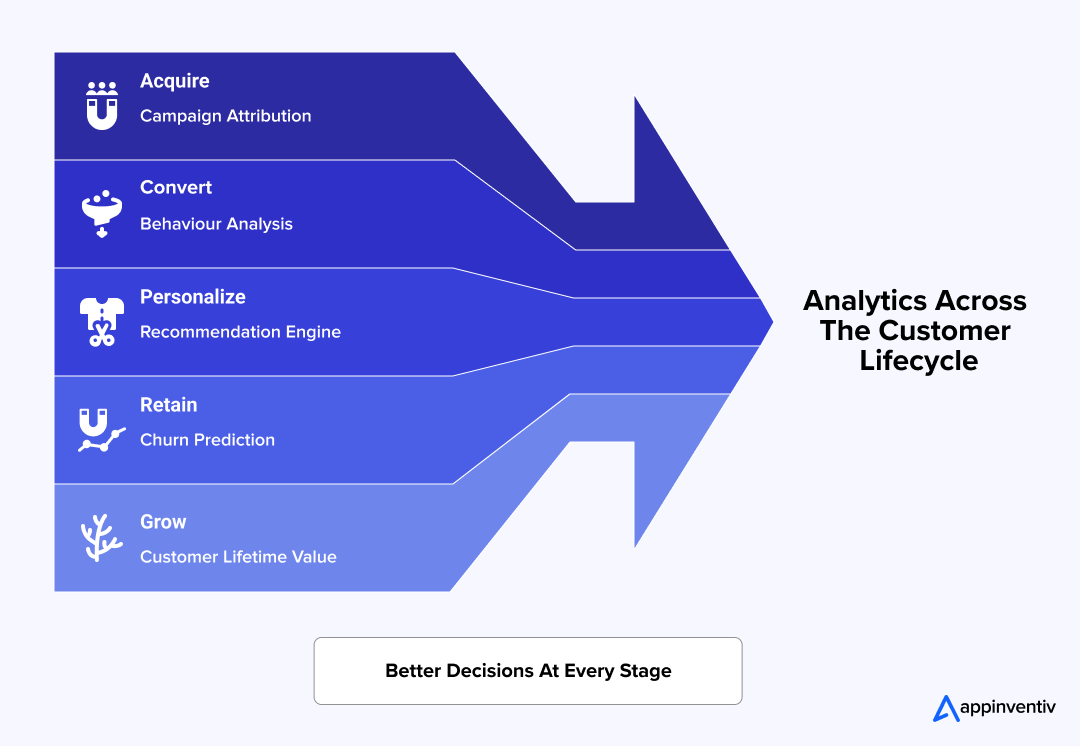
eCommerce analytics for businesses connect these separate touchpoints. It explains how buyers interact with your brand at every stage.
By combining customer records, marketing files, and sales data, your company can uncover new profit opportunities. You can cut operational waste. You can make smart choices across key business units.
Improving Customer Acquisition and Marketing Returns
Customer acquisition costs rise every year on digital networks. eCommerce tracking analytics helps executives see which campaigns bring the highest financial returns. Your team stops guessing about ad spend.
- Track campaign returns across paid search, organic traffic, and email networks.
- Analyze multi-touch attribution models to trace the exact paths to a sale.
- Measure true acquisition costs for specific buyer groups.
- Identify high-performing buyer cohorts and valuable traffic sources.
- Allocate media budgets based on real-time performance data.
Increasing Conversion Rates Through Behavioral Facts
Many sales difficulties come from buyer friction hidden inside the checkout path. Data reveals exactly where users drop off in your buying process. You can repair these broken links immediately to prevent sales losses.
- Monitor checkout paths from product discovery through the final payment click.
- Analyze clickstream logs to identify user intent.
- Evaluate page speeds, engagement metrics, and session patterns.
- Detecting checkout bottlenecks that cause shoppers to abandon carts.
- Measure the precise impact of continuous behavioral testing.
Delivering Personalized Shopping Experiences at Scale
Buyers expect relevant experiences during every interaction with your brand. Analytics for eCommerce helps your business fully understand buyer preferences. Your teams can build personal connections that drive sales.
- Build clear customer categories using past purchase histories.
- Power product suggestion engines, a core application of AI in eCommerce, with recent browsing data.
- Identify product affinity patterns for cross-selling opportunities.
- Send targeted deals to specific customer groups.
- Support automated personalization across multiple retail channels.
Improving Customer Retention and Lifetime Value
Keeping current buyers brings higher financial returns than winning new ones. Analytics detects churn risks before your revenue drops. Leaders can protect critical revenue streams early.
- Track repeat-purchase behavior across specific target groups.
- Identify churn signs using predictive data models.
- Measure customer lifetime value trends over business quarters.
- Evaluate loyalty program participation and engagement levels.
- Spot perfect moments for customer re-engagement campaigns.
Data tracking delivers direct financial returns. Research from Bain & Company shows that lifting customer retention by 5% boosts profits by 25% to 95%. The benefits of eCommerce analytics are clear: small gains in acquisition costs, checkout conversions, and buyer loyalty compound quickly to increase corporate revenue.
Refining Inventory Planning and Demand Forecasting
Stock choices impact corporate revenue, buyer satisfaction, and warehousing costs. Analytics provides the clarity required for accurate supply planning. You protect business cash flow from being tied up in storage.
- Project demand using historical records and seasonal trends.
- Monitor inventory turns and product availability.
- Identify slow-moving items and top sellers.
- Reduce out-of-stock events and expensive excess inventory.
- Align manufacturing and fulfillment schedules with expected demand.
Strengthening Omnichannel Commerce Performance
Large commerce operations span corporate websites, mobile apps, and retail stores. ERP integration alongside analytics tools creates a unified view across these different points. It removes blind spots for your executive team.
- Combine data from separate commerce channels.
- Measure channel-specific revenue and checkout performance.
- Track customer interactions across multiple corporate devices.
- Identify cross-channel buying behaviors.
- Support uniform reporting across the entire organization.
This visibility is becoming more important as online purchases are expected to account for 23% of global retail sales by 2027.
These combined tools move your business away from isolated reports. Your teams gain a unified view of customer habits, operational performance, and corporate revenue growth.
Essential eCommerce Analytics Metrics and KPIs Enterprises Should Track
Commerce systems generate thousands of data points daily. Business growth does not depend on tracking more metrics. It depends on tracking the right ones. A clear KPI framework powered by eCommerce analytics for businesses helps companies track revenue, acquisition, retention, and operations. These eCommerce performance analytics metrics provide the visibility needed for smart choices across marketing, sales, customer service, and supply chains.
Revenue and Conversion Metrics
These eCommerce performance analytics numbers show how well your business turns web traffic into cash. They help teams track buying habits and find options to increase sales performance.
Conversion Rate (CR)
This metric tracks the percentage of site visitors who buy an item.
- Formula: Conversion Rate (%) = (Total Orders ÷ Total Visitors) × 100
- Example: Your store gets 100,000 visitors and records 3,000 sales. The calculation is (3,000 ÷ 100,000) × 100, which equals 3%.
Dropping numbers point to buyer friction. Your platform might have bad search tools, slow pages, or checkout blocks.
For context, the average eCommerce conversion rate is approximately 2.91% across industries.
Average Order Value (AOV)
This metric tracks the average cash amount spent during one transaction.
- Formula: Average Order Value = Total Revenue ÷ Total Orders
- Example: A store generates $1,000,000 from 20,000 sales. The math is $1,000,000 ÷ 20,000, which equals $50.
This value helps teams plan product bundles, inventory choices, and cross-selling campaigns.
Revenue Per Visitor (RPV)
This indicator combines traffic numbers and checkout success into one clear calculation.
- Formula: Revenue Per Visitor = Total Revenue ÷ Total Visitors
- Example: A business makes $1,000,000 from 100,000 web visitors. The math is $1,000,000 ÷ 100,000, which equals $10.
The final number helps teams judge the total return on web traffic and sales efforts.
Customer Acquisition Metrics
Acquisition metrics show how your business wins new buyers. They evaluate your returns on marketing investments.
Customer Acquisition Cost (CAC)
This total tracks the average cash spend required to win one new buyer.
- Formula: CAC = Total Marketing and Sales Spend ÷ New Customers Acquired
- Example: A company spends $500,000 on ads and sales to win 5,000 new buyers. The calculation is $500,000 ÷ 5,000, which equals $100.
Tracking this number helps leaders balance growth plans with net profit goals.
Return on Ad Spend (ROAS)
This formula tracks the sales revenue generated for every dollar spent on ads.
- Formula: ROAS = Ad Revenue ÷ Advertising Spend
- Example: An ad campaign brings $1,000,000 in revenue from a $200,000 spend. The math is $1,000,000 ÷ $200,000, which equals 5. The campaign makes $5 for every $1 spent.
Traffic Source Performance
This work tracks the profit value of visitors from individual marketing channels. Teams review organic search, paid ads, email campaigns, affiliate systems, social commerce, and web marketplaces. They check conversion rates, CAC, and ROAS for each network. This comparison helps marketing teams allocate budgets to channels that deliver the best results.
Customer Retention Metrics
Retention metrics show how well your brand keeps buyers active after their first purchase. These numbers affect long-term profit margins.
Customer Lifetime Value (CLV)
This formula projects the total sales revenue a single buyer creates over time.
- Formula: CLV = Average Order Value × Purchase Frequency × Customer Lifespan
- Example: A customer spends $100 per order. They buy items four times a year and stay active for five years. The calculation is $100 × 4 × 5, which equals $2,000.
The total helps companies choose how much to spend on acquisition and retention while protecting profit margins.
Repeat Purchase Rate
This figure tracks the share of buyers who return to make extra purchases.
- Formula: Repeat Purchase Rate (%) = (Returning Customers ÷ Total Customers) × 100
- Example: A business has 10,000 customers, and 4,000 of them buy again. The math is (4,000 ÷ 10,000) × 100, which equals 40%.
High repeat rates indicate strong buyer satisfaction and brand loyalty.
Customer Churn Rate
This calculation tracks the share of buyers who stop purchasing over a specific timeframe.
- Formula: Customer Churn Rate (%) = (Lost Customers ÷ Total Customers at Start of Period) × 100
- Example: A business starts a quarter with 10,000 buyers and loses 500 of them. The calculation is (500 ÷ 10,000) × 100, which equals 5%.
Tracking churn highlights retention risks before they hurt revenue growth.
Operational and Commerce Performance Metrics
Operations data connects actual customer demand with inventory levels, order fulfillment, and supply chain speed.
Cart Abandonment Rate
This metric tracks how often shoppers add items to an online cart but leave without buying.
- Formula: Cart Abandonment Rate (%) = [(Carts Created − Completed Purchases) ÷ Carts Created] × 100
- Example: Shoppers open 10,000 carts but complete only 3,000 sales. The math is [(10,000 − 3,000) ÷ 10,000] × 100, which equals 70%.
High rates may often indicate checkout blocks, surprise delivery fees, or payment gaps in your eCommerce app features.
Inventory Turnover
This equation tracks how fast your business sells and replaces warehouse stock.
- Formula: Inventory Turnover = Cost of Goods Sold (COGS) ÷ Average Inventory Value
- Example: A store records $5 million in COGS. It maintains an average inventory value of $1 million. The math is $5,000,000 ÷ $1,000,000, which equals 5.
Fast turnover rates reveal good stock practices and strong corporate cash flow.
Fulfillment Performance
This metric monitors how quickly and accurately orders move through warehouse operations. Teams measure performance using order cycle hours, on-time delivery rates, order accuracy rates, and product return rates. These numbers affect customer satisfaction and operational costs.
Executive-Level Metrics That Matter Most to Enterprise Leaders
Operations teams monitor dozens of data points. Enterprise leaders focus on a smaller group of KPIs. These metrics connect directly to growth, net profits, and business performance.
| KPI | Business Value |
|---|---|
| Revenue Growth Rate | Measures overall business expansion |
| Customer Acquisition Cost (CAC) | Evaluates growth returns |
| Customer Lifetime Value (CLV) | Measures long-term customer value |
| CLV-to-CAC Ratio | Assesses acquisition profits |
| Conversion Rate | Indicates eCommerce success |
| Revenue Per Visitor (RPV) | Connects traffic quality with revenue |
| Customer Retention Rate | Reflects customer loyalty and future revenue |
| Inventory Turnover | Measures warehouse speed |
| Forecast Accuracy | Supports stock and financial planning |
Viewed together, these metrics provide a complete picture of commerce performance. They help enterprise leaders make fast, data-backed choices across the entire organization.
Turn conversion, retention, and acquisition metrics into actionable growth strategies before losses compound.
Building an Enterprise eCommerce Analytics Architecture
Good data tools require more than simple dashboards. Large companies need a robust system for collecting data. This system supports your buyer tracking and warehouse visibility. A mature setup connects data tracking, storage tools, and software programs.
Data Collection and Tracking Platforms
Every data strategy begins with tracking. These eCommerce analytics software programs record buyer choices across your digital storefronts.
Google Analytics 4 (GA4)
Google Analytics 4 tracks buyer actions on websites and mobile apps. It records specific events, such as product views and final purchases. The software gives executives clear views into ad channels.
Adobe Analytics
This software serves large brands with heavy data needs. Global companies use it to track buyers across apps and stores. The system builds advanced reports for complex ad tracking.
Mixpanel
Mixpanel tracks individual actions on your digital storefront. Teams see exactly how buyers use specific features. This visibility shows engagement patterns and fixes broken checkout paths.
Customer and Commerce Intelligence Platforms
The core features of the eCommerce analytics platform tool go beyond showing what buyers do; intelligent software explains why buyers make those choices.
Contentsquare
Contentsquare reviews user actions with session replays and click maps. These tools show site design errors and checkout struggles. Your team spots bugs that reduce your sales.
Klaviyo
Klaviyo connects sales records with automated marketing. It groups buyers based on past sales and site interactions. Companies use this tool to increase repeat sales.
Triple Whale
Triple Whale concentrates on ad tracking and performance metrics. It combines marketing costs and sales revenue into one dashboard. The tool helps companies connect ad spend with net profits.
Central Data Repositories and Profile Software
Scaling analytics tools for eCommerce separates corporate data sets across systems. Files get stuck in CRM systems and payment networks. This division creates regular reporting errors.
Enterprise data warehouses hold your structured data in one place. Enterprise data warehouses built on cloud computing platforms such as Snowflake, BigQuery, and Amazon Redshift handle heavy business data tracking.
Customer Data Platforms (CDPs) pair well with data warehouses and digital asset management systems. They build single buyer files from multiple sources. This complete view lets teams match buyer habits across channels. It improves your audience targeting and marketing plans.
Privacy, Compliance, and Security
Data tracking brings operational risk alongside corporate rewards. Customer details pass through websites, mobile apps, and payment systems. This broad reach increases corporate legal risk.
Laws like GDPR compliance regulations and the CCPA govern how your business collects and stores buyer data. Web browser updates limit standard tracking cookies. Your teams must focus on direct files from your own store.
To protect buyer trust and follow regulations, execute these protective steps:
- Build clear consent forms and choice screens for web visitors.
- Set strict user access permissions for sensitive financial files.
- Encrypt customer records and transaction files across all systems.
- Keep clear management paths and digital audit logs.
- Focus your budget on gathering your own first-party data.
- Check your alignment with regional laws regularly.
Proper security rules protect your brand from heavy legal penalties. They fix data quality and build buyer loyalty over time. Safe systems protect your entire tracking investment.
Automated Analytics and Choices
Modern systems use artificial intelligence to scan massive files. Computers spot hidden patterns quickly.
Machine learning models project seasonal demand and buyer churn. They estimate customer value and identify shopping trends. These tools guide your inventory plans and financial targets.
Decision platforms use automation and custom rules to pick actions. The software suggests pricing changes and identifies cross-selling options. It instantly sets up personal shopping features. This technology supports fast corporate choices every day.
Common eCommerce Analytics Challenges and How Enterprises Overcome Them
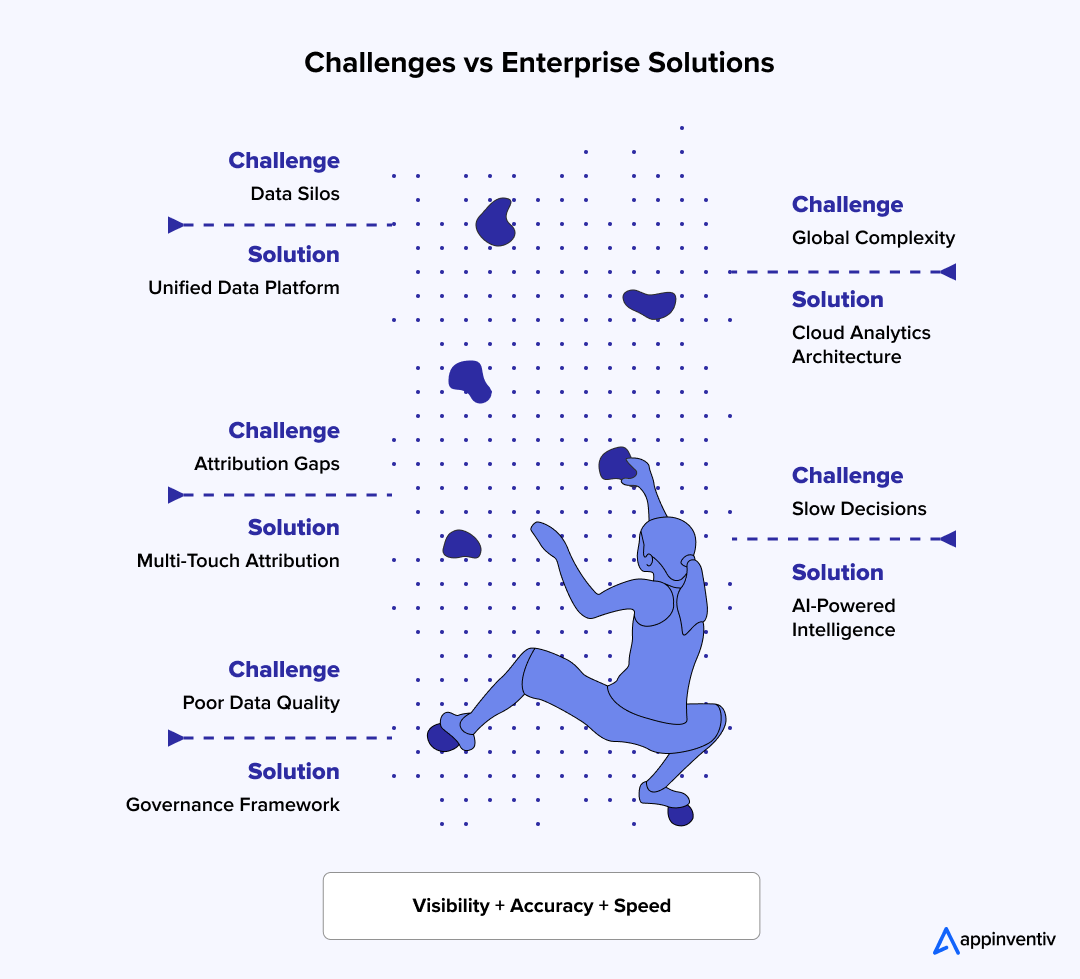
eCommerce analytics for businesses requires more than simple dashboards. The most common challenges with eCommerce business analytics arise as companies grow across multiple sales networks, encountering obstacles that obscure trends, undermine accuracy, and delay major decisions.
Fixing these problems requires clear tech choices, strict rules, and fast operations.
Fragmented Data Across Commerce Systems
Large brands gather facts from dozens of separate platforms. Websites, mobile apps, CRM systems, and payment gateways all collect information. Yet these files stay separate.
This split leads to mismatched reports. The marketing team tracks ads on one screen, while the logistics team monitors stock on another. Executives cannot trace the buyer’s entire path.
Brands resolve this through proven technology solutions such as data warehouses and customer data platforms that provide a single source of data. These setups form a single source of numbers, aligning all business departments.
Attribution and Measurement Complexity
Shoppers rarely buy items through just one network. A customer finds your item on social media. They search for it later, read an email, and buy it on a desktop. This multi-step path makes eCommerce tracking analytics difficult.
Traditional last-click software ignores early brand touches. It fails to show which ads actually started the interest.
To solve this, brands use multi-touch attribution and marketing mix models. These systems show exactly which ad channels bring real cash. They help managers allocate marketing funds where they work best.
Data Quality and Governance Issues
Reports are only as good as the underlying files. Double records, tracking errors, and missing events quickly ruin data accuracy. Bad numbers become common as companies enter new regions or adopt new tools.
Top companies fix this by making clear rules for file ownership and validation. They also run automated software to spot errors before they skew your corporate choices.
Scaling Analytics Across Global Operations
Tracking gets harder when your brand expands worldwide. Individual regions use different currencies, laws, and languages. A reporting template that works in one country fails in another. Teams must mix local business needs with global corporate views.
Global brands overcome this hurdle by aligning primary metrics across borders, often starting with legacy modernization before deploying cloud platforms that offer local flexibility alongside global corporate visibility.
Turning Insights Into Actionable Business Outcomes
Collecting files is easy, but acting on them is hard. Many managers build deep dashboards but cannot turn trends into actual profit. Teams find a checkout error but have no clear system to repair it.
Leading brands close this gap by linking analytics tools directly to operational software and automated ad systems. This connection links your data to fast execution. Winning brands treat data as a daily asset. They combine numbers, rules, and actions to grow revenue and scale performance.
Enterprise Roadmap for Building eCommerce Analytics
Clear data plans require more than simple dashboards. Companies need a structured setup plan. This plan matches your corporate goals with your data software, data rules, and team steps. This guide outlines the main stages to build a scalable data system for your business.
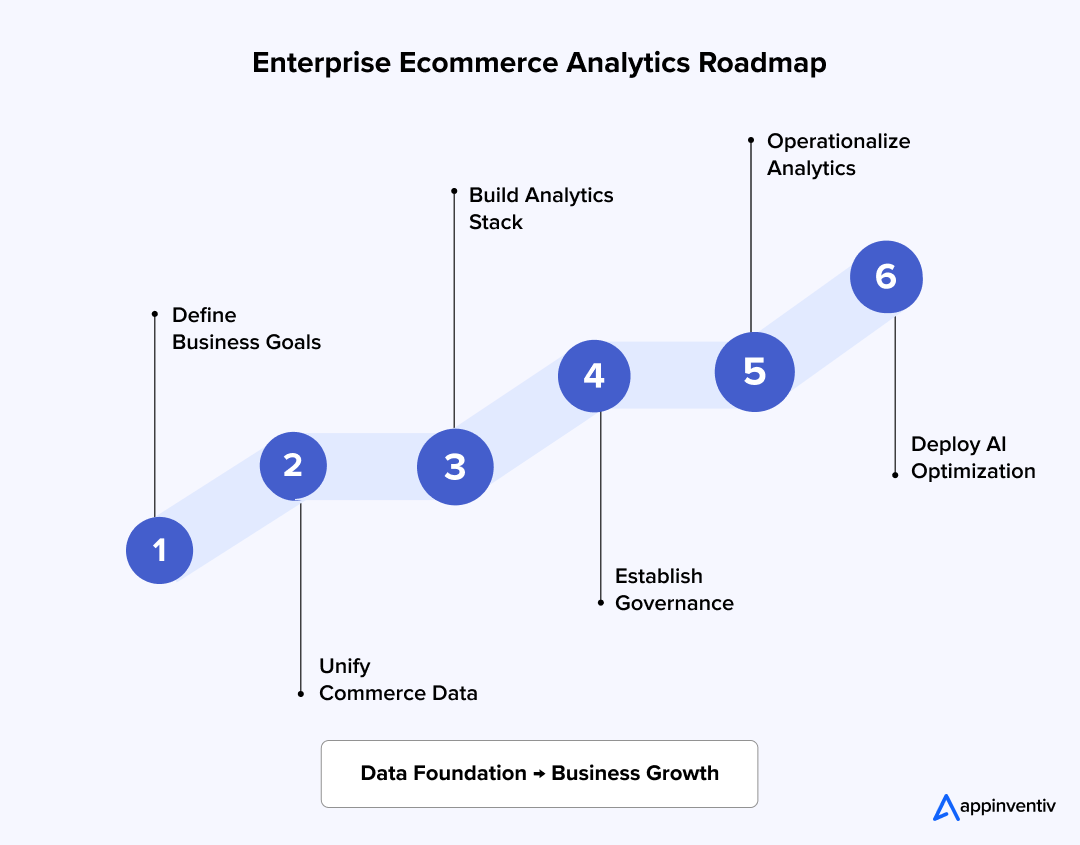
Set Clear Corporate Goals and Success Metrics
You must choose clear business goals before buying platforms or building dashboards. Your data projects must support clear sales results. They should not operate as simple reporting tasks.
- Identify top goals like revenue growth, buyer retention, checkout conversions, or warehouse speed.
- Define the main metrics that match those specific goals.
- Record your current baseline numbers.
- Set realistic growth targets for your teams.
- Align your executive team around the same success rules.
Also Read: 25+ Profitable eCommerce Business Ideas to Start in 2026
Build a Unified Sales Database
eCommerce data analytics requires sales information from across separate systems and channels. Disconnected files cause bad reporting. This division slows down your corporate choices.
- Gather files from store websites, CRM systems, ERP tools, and marketing platforms.
- Build central file storage using data warehouses or data lakes.
- Create a single view of the buyer across all touchpoints.
- Match your data setups and file naming rules.
- Delete duplicate records and conflicting entries.
Choose the Right Tech Setup and Software Stack
Whether you are in the early stages of eCommerce app development or scaling an existing platform, your analytics setup must handle your current needs and future growth. Technical choices must focus on system growth, tool connections, and long-term corporate needs.
- Review your tracking software and data-gathering programs.
- Choose display dashboards and business intelligence tools.
- Deploy customer data platforms to manage buyer files.
- Build connections so different software systems can share information.
- Set up data frameworks that support live reports.
Also Read: Cost to build an eCommerce app: Breaking down based on complexity, types, and more.
Create Management, Security, and Data Quality Rules
Bad data quality can ruin your analytics projects under any technology. Management rules maintain team trust, file consistency, and legal compliance.
- Name the specific managers responsible for individual data sets.
- Match your metric rules across all corporate departments.
- Set up strict steps to validate incoming information.
- Create user access locks and clear security rules.
- Track file quality with automated checks and instant alerts.
Push Data Tools Into Daily Operations
eCommerce analytics tools deliver value only when teams use them to guide decisions. Tool adoption must expand past data specialists and reporting teams.
- Give individual managers dashboards designed for their specific corporate roles.
- Integrate data-tracking tools directly into daily team tasks.
- Train business managers to read and understand metrics.
- Automate regular reports and system alerts.
- Require data facts for big decisions across all departments.
Add Automated AI Systems for Constant Progress
When your database is ready, your company can add advanced features. You can deploy tools run by artificial intelligence and machine learning.
- Set up machine models to project future inventory demand.
- Deploy software to predict when buyers might leave your brand.
- Add personal suggestion engines to your storefront websites.
- Automate price shifts and warehouse stocking choices.
- Refine your formulas constantly using new sales facts and feedback.
Companies that apply this guide build data systems that expand with sales growth. They create a solid base. This base connects numbers, software, and executive choices across your entire digital store.
Move from fragmented reporting to AI-powered decision intelligence that accelerates enterprise growth.

Emerging Trends Shaping the Future of eCommerce Analytics
eCommerce analytics for businesses now reaches past simple dashboards and old reports. Rapid advances in artificial intelligence, automation, and real-time data are accelerating digital transformation across the industry, changing how companies collect metrics and respond to buyer choices.
These technologies help brands change from late tracking to early corporate action. Industry forecasts expect global eCommerce sales to surpass $7.9 trillion by 2027.
Generative AI in eCommerce Analytics
Generative AI makes tracking files accessible to all corporate teams. Workers do not wait for data specialists to compile thick reports. Instead, users ask questions using plain text. Instead, users interact through AI chatbots using plain text to get instant summaries and clear suggestions.
This setup removes reporting blocks and speeds up corporate choices. Recent data shows AI-driven eCommerce traffic increased by 805% during Black Friday, highlighting how quickly AI adoption is accelerating.
Predictive Commerce Intelligence
Predictive analytics and eCommerce intelligence now form a central part of store operations. Machine learning models project stock demand and spot customer churn risks. They calculate customer lifetime value and catch buying trends early. These features help companies plan more accurately. Leaders distribute cash and staff where they work best.
Agentic Analytics and Autonomous Decision-Making
Technologies like agentic RAG mark the next phase of data tools, in which models track sales, detect technical errors, and identify sales paths without human review. The programs suggest immediate corporate actions. In active environments, the systems automatically trigger tasks. They change prices, adjust inventory levels, or launch customer ads instantly.
Real-Time Personalization at Scale
Buyers expect a personal touch during every interaction. Modern platforms review actions, sales history, and context instantly. The software delivers immediate product suggestions and targeted deals. Fast data processing speeds make this capability a standard feature. It is no longer just a rare competitive edge.
More than 56% of eCommerce transactions now occur on smartphones, making PWA for eCommerce and real-time personalization increasingly important.
Also Read: AR in eCommerce: Benefits, Use Cases and Examples
How Appinventiv Turns Commerce Analytics Into Financial Growth
Many companies face the hard challenges detailed in this guide. They deal with separate files, blind spots, and mismatched reports. Many corporate tech investments bring zero returns.
Appinventiv removes these hurdles through expert eCommerce analytics consulting. We build corporate analytics environments that connect your data, tools, and commercial outcomes.
| Enterprise Challenge | How Appinventiv Helps |
|---|---|
| Isolated commerce data | Shared data structures and complete buyer profile setups |
| Complex ad tracking | Cross-channel measurement setups and tracking tools |
| Bad data quality | Clear data rules, verification steps, and uniform reporting |
| Hidden business metrics | Live dashboards and decision intelligence setups |
| Slow corporate choices | Predictive data tools and automated features |
Our eCommerce analytics services and data track record include:
- Delivered over 400 digital store platforms.
- Served more than 30 global retailers and brands.
- Brought 9-plus years of digital change experience to companies.
- Built partnerships with over 25 major payment gateways.
- Raised checkout conversions by up to 40% using personal shopping tools.
- Maintained a 99.50% transaction reliability standard.
- Earned a 96% client satisfaction score from corporate partners.
Appinventiv supports your brand from early planning through data engineering. We deploy automated tools to judge buyer intent. Our eCommerce app developers help your enterprise build eCommerce analytics for business setups that expand over time.
These setups increase your sales revenue and protect buyer loyalty. They also increase your daily operational speed.
Let’s connect and fix eCommerce analytics bottlenecks before they cost revenue.
Frequently Answered Questions
Q. What is eCommerce Analytics?
A. eCommerce analytics for businesses means tracking and studying data from storefront websites, mobile apps, and ad networks. The system helps brands track buyer choices and calculate true marketing returns. It spots easy paths to increase sales revenue and warehouse performance. Modern setups combine historical sales data, predictive analytics, and automated decision-making to drive corporate growth.
Q. Why is eCommerce Analytics Important?
A. This eCommerce analytics practice helps executives make choices based on clear facts rather than simple guesses. It provides direct visibility into buyer acquisition costs and checkout conversion rates. Teams track exact purchase choices, warehouse inventory levels, and long-term customer value. These files help leaders identify corporate growth opportunities and quickly resolve warehouse problems. Your business adapts fast to new market shifts.
Q. How Does Analytics Improve eCommerce Sales?
A. The technology shows the exact items that persuade buyers to complete a purchase. Teams study ad channels, checkout paths, user choices, and specific product speeds. This tracking lowers checkout friction and sharpens pricing plans. Storefronts provide personalized experiences that perfectly match buyers’ interests. These precise adjustments lead to higher conversion rates, larger order sizes, and stronger corporate revenue.
Q. How Can eCommerce Analytics Improve Customer Retention?
A. Data tools show how buyers interact with products and marketing ads following their first purchase. Teams monitor repeat-purchase habits, lifetime financial value, and sudden churn signals. Managers spot unhappy buyers early and deploy targeted ads to protect the account. The data powers loyalty programs and automated product recommendations. These systems build strong buyer relationships that protect your long-term revenue streams.
Q. What Are the Best Implementation Practices for eCommerce Analytics?
A. Good data setups start with clear corporate goals and measurable key metrics. Companies must build a unified data home to connect separate sales tools. Leaders set tight file rules, enforce strict quality checks, and share reports across all departments. Pair these standard rules with automated machine predictions and constant performance tracking. Your business captures high financial value from your technology software spend.
Q. How Do Enterprises Choose the Right eCommerce Analytics Platform?
A. Select the right eCommerce analytics platform based on your corporate goals, not a feature checklist. The right tool connects your storefronts, CRM platforms, and ERP apps. Choose a scalable system that updates instantly. The top option handles global operations and helps your executive team turn sales data into direct choices.
Q. What Is the Difference Between eCommerce Analytics and Business Intelligence?
A. Commerce analytics tracks specific digital shop activities, such as buyer habits, checkout rates, and marketing returns. Business Intelligence handles a broader corporate scope. BI software gathers data from all departments, including finance, logistics, and HR. Commerce metrics act as a focused data feed inside your larger company-wide BI system.

- In just 2 mins you will get a response
- Your idea is 100% protected by our Non Disclosure Agreement.

How Much Does It Cost to Build an eCommerce Marketplace App Like Poshmark?
Key takeaways: Poshmark-like marketplaces enable unlocking new sources of revenue through transforming social interaction into low-capital-intensity repeat purchases. A marketplace app would cost between $40,000 and $400,000 to develop, depending on its features, platform and enterprise scalability needs. Special implementation, beginning with tests or single categories, confirms supply, demand, and monetization in 6-12 months. Trust,…

How Much Does It Cost to Build a Fashion Marketplace App Like Depop in the UK?
Key takeaways: A Depop-style fashion marketplace in the UK usually costs £32,000 to £320,000, depending on how simple or advanced you want the app to be. The UK’s resale-fashion scene is growing quickly, so demand for social, pre-loved fashion apps is only going up. Costs increase when you add things like AI recommendations, logistics integrations,…

How Much Does It Cost to Develop an eCommerce Platform Like The Iconic in Australia?
Key takeaways: Building an eCommerce platform like The Iconic in Australia costs anywhere from AUD 70,000 to AUD 700,000+ depending on scale and sophistication. Prioritise a governance-led roadmap with local cloud hosting to meet Australian data residency and security standards. Opt for Headless or Microservices to ensure elastic scalability during peak Australian retail events like…